Flow Board: every bid by stage, owner and due date.
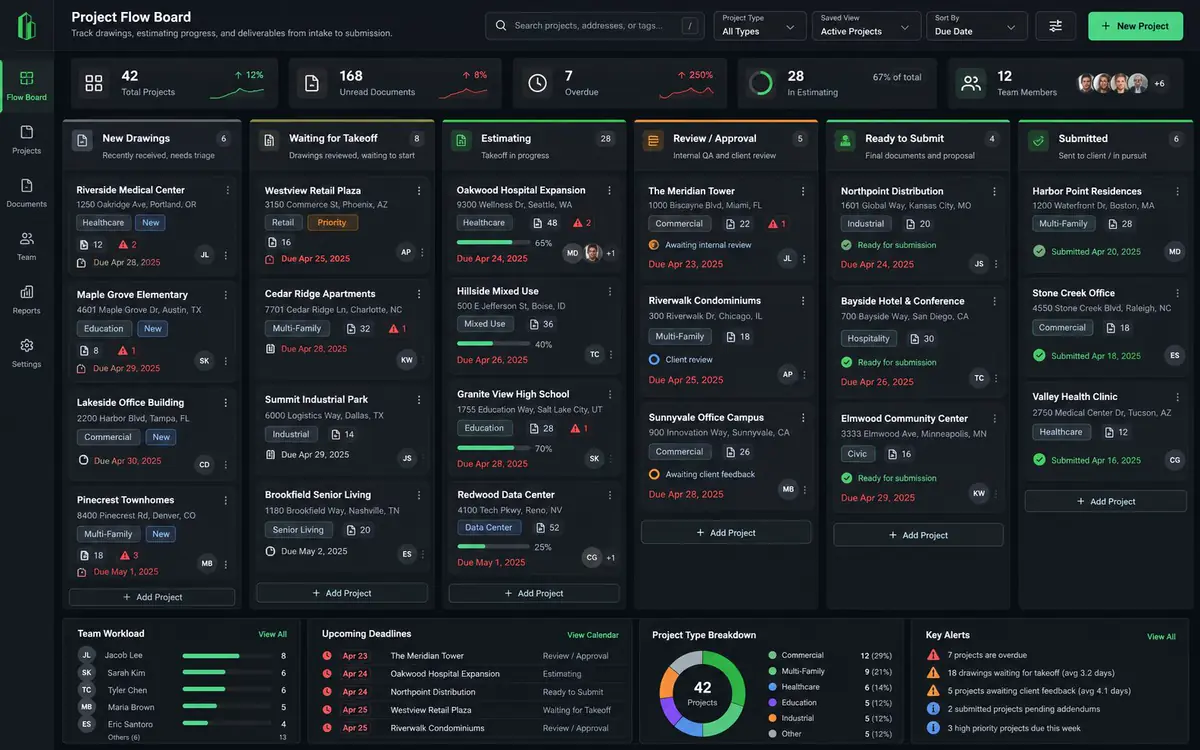
Every bid has a stage, an owner and a deadline. The Flow Board is planned as a local-first Kanban board that follows each bid from drawings received to won or lost, right beside your takeoff.
The tools described below are planned or at concept stage. Concept screens are design explorations, and details will change; the clip near the end shows the real app. What exists today is the takeoff, bid day, markup, estimating and document toolset.
See every bid, by stage, at a glance.
Drag a bid from one column to the next as it moves. Each card carries its owner, due date and the next thing that has to happen.
- Columns for the stages you actually use: drawings received, bid or no-bid, estimating, review, submitted, won or lost.
- Owners and due dates on every card, with overdue bids easy to spot.
- Follow-up reminders after submission, so a quote does not go quiet.
- Win and loss notes you can look back on next season.
- Workload by person and the deadlines coming up.
Gates that stop a bad bid early.
Before a bid moves forward, the board can ask the questions that save you a week. Is it in scope for us? Do we have the capacity? Are the addenda in?
- Stage gates: a short checklist a bid has to clear before it moves on.
- Bid / no-bid decision recorded with a reason, so you can see your own pattern.
- Win / loss captured at the end, with notes for next time.
One page that tells you where a bid stands.
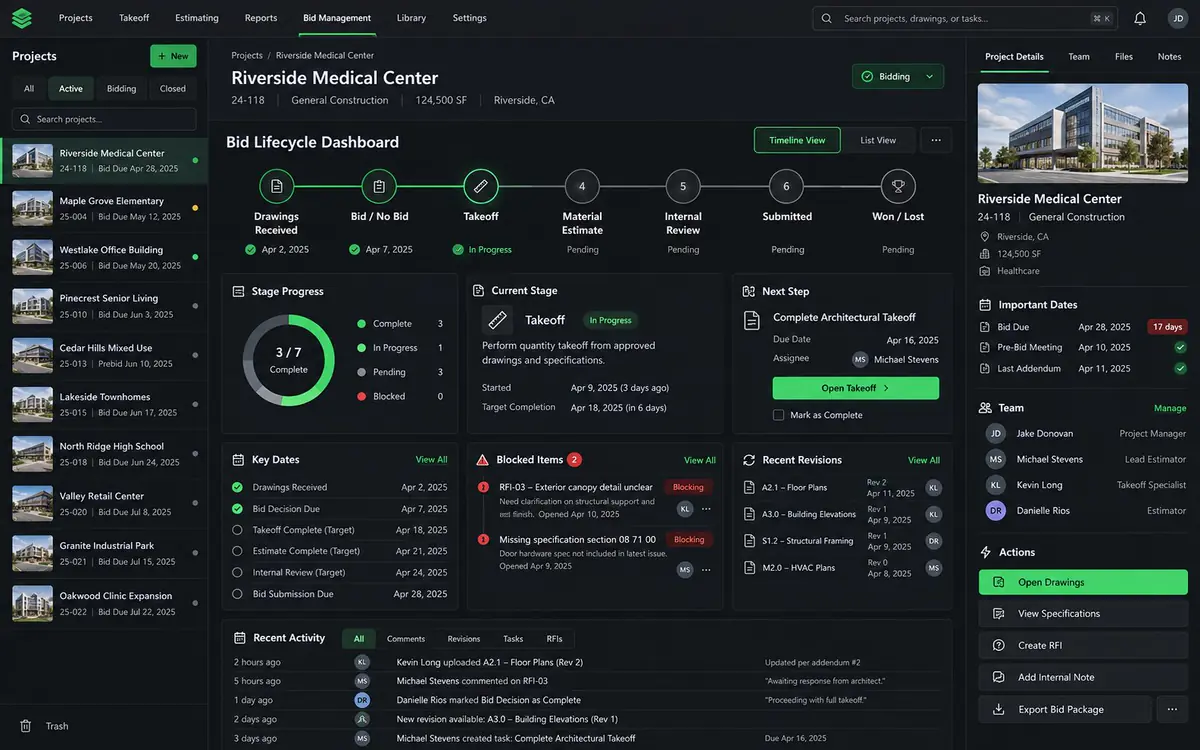
The lifecycle dashboard follows a single bid through its stages: what is done, what is next, what is blocked and which dates are coming.
- Stage progress from drawings received to won or lost.
- Next step, assignee and due date up front.
- Key dates, blocked items and recent revisions in one view.
- Open the takeoff for that bid straight from the dashboard.
Built to work with no signal and no server.
The first version is planned to run on your own PC, with your own data, like the rest of the toolset. A shared company version can come later.
Works offline
Bids, stages and notes live on your machine. Open it in a trailer or on a plane.
PlannedYour data, your folder
No required cloud account. Nothing leaves your PC unless you choose to share it.
PlannedShared board, later
An optional company-wide board so the whole bid desk sees the same pipeline.
ConceptWhat you can use now, and what is still ahead.
AvailableWorks today
- Takeoff and measurement on PDF drawings
- PDF markup, stamps and a Tool palette
- Formula columns and Excel export
- Compare, sets, batch and Script Flows
- The Bid menu: set up from a plan-room zip, addenda, health check, freeze the bid, bid letter
PlannedFlow Board roadmap
- Kanban bid board with owners and due dates
- Stage gates and bid / no-bid decisions
- Follow-up reminders and win / loss tracking
- Lifecycle dashboard for each bid
Proposed add-on pricing is listed on the Add-ons page. It cannot be purchased yet.
Available The takeoff health check, in the real app
Follow the plan.
Tell us how you track bids.
Tell us what the Flow Board should do first.